










Azerbaijan e-Visa Status Check: How to Track Your ASAN Visa Application
You have applied for an Azerbaijan e-visa and the confirmation email said a few working days. Now you want to know where the application stands, or you need to download the visa again before your flight. All of this is done on one official website, in a couple of minutes, with details you already have.
Below is the process step by step, what each status means, and what to do if the application is delayed or refused. If you want to know whether a visa an agent sent you is genuine, that is a slightly different check, covered in our guide on how to verify an Azerbaijan visa and spot a fake.
Use only the official portal
Azerbaijan's electronic visa is called ASAN Visa, and the only official website for it is evisa.gov.az. Search results are full of lookalike sites with similar names and logos. They are intermediaries, not the government, and their "status check" only shows you what they choose to show. Always check that the address ends in .gov.az before you enter your passport details.
Three ways to check your status
On the portal, open the Application menu and choose the option for an existing (incomplete) application — not "New application". You will be offered three ways to find your file. Menu names on the portal change from time to time, but the three options have stayed the same.
| Method | What you enter | Best for |
|---|---|---|
| By registration number | The registration number you received after submitting and paying | People who applied themselves and kept the confirmation email |
| By email | The email address used in the application, your passport number and the captcha | Applicants who lost the registration number |
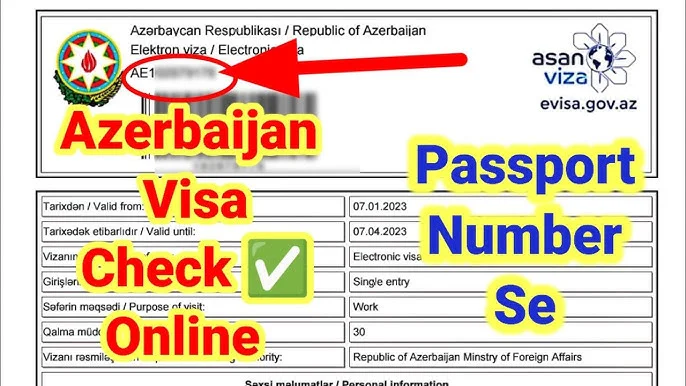
| By passport number | The e-visa number printed next to the barcode on the visa, your passport number and the captcha | People whose visa was arranged by someone else |
Step by step: checking by passport number
- Go to evisa.gov.az and open the section for an existing application.
- Choose By passport number.
- Enter the e-visa number — it starts with a letter and is printed next to the barcode on the visa — and your passport number.
- Type the verification code and press Continue.
- The page shows your application with your name and visa number. If the visa has been issued, a Download visa button appears.
What each status means
- Approved / visa issued. Download the PDF, check every detail against your passport and print it or keep it on your phone.
- In process. The application is still being reviewed. Standard applications are usually decided within three working days; an urgent option with a much shorter processing time is offered on the portal.
- Rejected. The visa was refused. See below for the usual reasons.
- No application found. The details do not match any application. Re-type them carefully; if you still see nothing, the registration number or email may not be the one you think.
If the application is taking longer than expected
- Check the spam and promotions folders of the email you used — the decision and the visa are sent there.
- Make sure the payment actually went through. An application without completed payment is not processed.
- Write to the ASAN Visa support address, info@evisa.gov.az, with your registration number.
- If someone else applied for you, ask them for the registration number and the email they used. You are entitled to both.
Common reasons for refusal
- Details in the form do not match the passport — a misspelled name, swapped dates, a wrong passport number.
- The passport is not valid long enough beyond the end of the planned stay.
- The photo or passport scan is unclear, cropped or edited.
- The applicant's nationality is not eligible for the e-visa and must apply at an embassy or consulate.
Correct the problem and submit a new application. If you are not sure why the visa was refused, our team can review the application with you before you apply again — see our Azerbaijan visa services.
Before you fly: check the visa itself
Once downloaded, compare the visa with your passport and your plans: full name, passport number, date of birth, the visa type (tourist, business or work), the validity dates and the number of entries. A tourist e-visa does not allow you to work. If you are travelling for a job, you need a work visa issued on the basis of a work permit — see our guide on the Azerbaijan work visa.
Let us check it for you
If you cannot find your registration number, the portal does not recognise your details, or you simply want a second pair of eyes, fill in the short form below this article with your name, passport number and contact details. Our team in Baku checks the official portal and replies to you.
Frequently asked questions
Can I check my Azerbaijan visa status by passport number?
Yes. On evisa.gov.az choose the option for an existing application, then "By passport number", and enter your passport number together with the e-visa number printed on the visa.
How long does an Azerbaijan e-visa take?
Standard applications are usually decided within three working days. An urgent processing option is also available on the portal.
I lost my registration number. What can I do?
Use the email method — the email address from the application plus your passport number — or the passport number method if you have a copy of the visa.
Can I download my e-visa again?
Yes. Find the application with any of the three methods and use the "Download visa" button.
Is a site that offers a visa status check without .gov.az official?
No. The only official ASAN Visa website is evisa.gov.az. Other sites are private intermediaries.
Related

Check Azerbaijan Visa Status online
Your request has been sent successfully. You will receive a response shortly !
We will arrange a meeting with a World Immigration Hub specialist for you in person or online format
During the meeting, the specialist will:
- Explain how we work and how we can help you.
- Explain the immigration process step-by-step, presenting the roadmap, budget, and financial requirements.
- Share our immigration experience and discuss key points you should know before starting your journey.
- Determine the next steps together with you.
Depending on the project’s complexity, the meeting with the manager may be coordinated with experts, designers, and assistants.

Natalia Kovalenko
Immigration Consultant

Mehman Asadzade
Immigration Lawyer